
If you are searching what is notebooklm, you are not alone. Many people want to know how this new AI tool works and how it can help with research, notes, and ideas.
NotebookLM is an advanced AI-powered research assistant created by Google. It is designed to help users understand documents, organize information, and generate insights from their own sources.
When people ask what is notebooklm, the simple answer is that it is an AI tool that reads your documents and helps you analyze them. Instead of searching for information across many websites, NotebookLM allows you to upload files and ask questions directly about the content.
This makes it especially useful for students, researchers, writers, and professionals who work with large amounts of information.
In this guide, you will learn what is notebooklm, how to use notebooklm, notebooklm features, notebooklm pricing, and whether notebooklm is free. We will also compare it with ChatGPT to understand how the two AI tools are different.
By the end of this article, you will clearly understand what is notebooklm and how it can improve your research and productivity.
What is NotebookLM
Many people are asking what is notebooklm and why it is becoming popular among students and researchers.
NotebookLM is an AI-powered research and note-taking tool developed by Google. It helps users analyze documents, summarize information, and generate insights from their own sources.
When you upload files to NotebookLM, the AI reads the content and allows you to ask questions about it. This makes it easier to understand complex topics without manually reading every page.
For Example, if you upload a research paper, you can ask:
- “Summarize this document.”
- “What are the key points?”
- “Explain this topic in simple words.”
The AI answers based on the uploaded sources, which makes the responses more reliable.
In simple words, if someone asks what is notebooklm, the answer is that it is an intelligent research assistant that works with your documents.
AI-First Note-Taking
NotebookLM is designed as an AI-first note-taking system.
Traditional note-taking tools require users to manually organize and summarize information. But NotebookLM uses artificial intelligence to automate these tasks.
With this tool, you can:
- Summarize long documents
- Extract key insights
- Create structured notes
- Ask questions about your data
This makes research faster and easier.
Students can use NotebookLM to study textbooks. Researchers can analyze papers. Writers can collect ideas from multiple sources.
Grounding in Your Sources
One of the most powerful features of NotebookLM is source grounding.
Most AI chatbots generate answers from general knowledge. But NotebookLM focuses only on the documents you upload.
This means the AI answers are based on your own materials.
For example, if you upload five research articles about AI, NotebookLM will use those articles to generate responses.
This approach has several benefits:
- More accurate answers
- Less misinformation
- Better research insights
It is especially useful for academic research and professional work.
The Podcast Feature
Another unique feature of NotebookLM is AI podcast generation.
The tool can convert your documents into a conversation-style podcast. The AI creates a discussion between two virtual speakers who explain the topic.
This feature helps users learn information in an audio format.
For example, if you upload a long research paper, NotebookLM can generate a short podcast that explains the main ideas.
This is useful for people who prefer listening instead of reading.
NotebookLM Features
To understand what is notebooklm, it is important to explore its main features. NotebookLM includes several powerful features that make research easier and faster.
The Notebook Guide
The Notebook Guide helps users quickly understand the content of their uploaded documents. When you add sources such as PDFs, Google Docs, research papers, or web pages, NotebookLM automatically analyzes them and generates summaries, key topics, timelines, and study guides, saving significant time because users do not need to manually review every page. This feature saves a lot of time because users do not need to read every page manually. Instead, they can quickly see the main ideas and important points from all sources in one place.
Example:
If a student uploads a 20-page research paper about Artificial Intelligence, NotebookLM can instantly generate a summary, highlight the main concepts, and create a study guide with the most important points.
Asking Questions
NotebookLM allows users to ask questions about the documents they upload. The AI reads the sources and answers the question based only on the information available in those documents. It also provides references to the exact section of the source where the answer was found. This helps users verify the information and improves accuracy.
Example:
If you upload a business report and ask, “What are the main challenges mentioned in this report?” NotebookLM will analyze the document and list the key challenges along with references from the report.
Generating Ideas
NotebookLM can also help generate new ideas based on your documents. After analyzing your sources, it can suggest content ideas, research questions, article outlines, or discussion topics. This feature is very helpful for writers, bloggers, and researchers who need inspiration.
Example:
If a blogger uploads several documents about AI tools, NotebookLM can suggest article ideas like:
- “Top AI Tools for Beginners”
- “How AI Is Changing Content Creation”
- “Future Trends in AI Technology”
Podcast Generation with NotebookLM
NotebookLM includes an AI podcast generation feature that converts information from your documents into a natural conversation between AI hosts. This makes the content easier to understand and more engaging to consume in audio format.
Example:
If a user uploads study materials about climate change, NotebookLM can create a short podcast where two AI speakers discuss the main points, making the topic easier to learn while listening.
Structured Formats
NotebookLM can organize information into clear and structured formats such as summaries, FAQs, bullet-point notes, outlines, and study guides. This helps users understand complex topics quickly and makes large amounts of information easier to read.
Example:
If you upload a long product manual, NotebookLM can convert it into:
- A short summary of the main instructions
- A step-by-step guide
- A list of frequently asked questions (FAQs)
This structured format helps users quickly find the information they need without reading the entire document.
How to Use NotebookLM
Using NotebookLM is simple and helps you analyze and understand documents more efficiently. Follow these basic steps to get started.
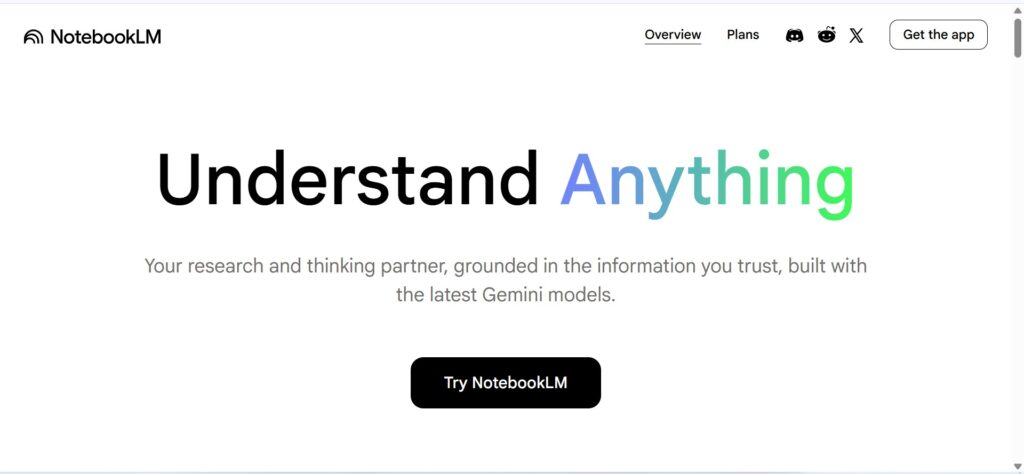
1: Visit NotebookLM
Visit the official NotebookLM website and sign in with your Google account. The NotebookLM website will look something like the one shown in this image.
2: Create a Notebook
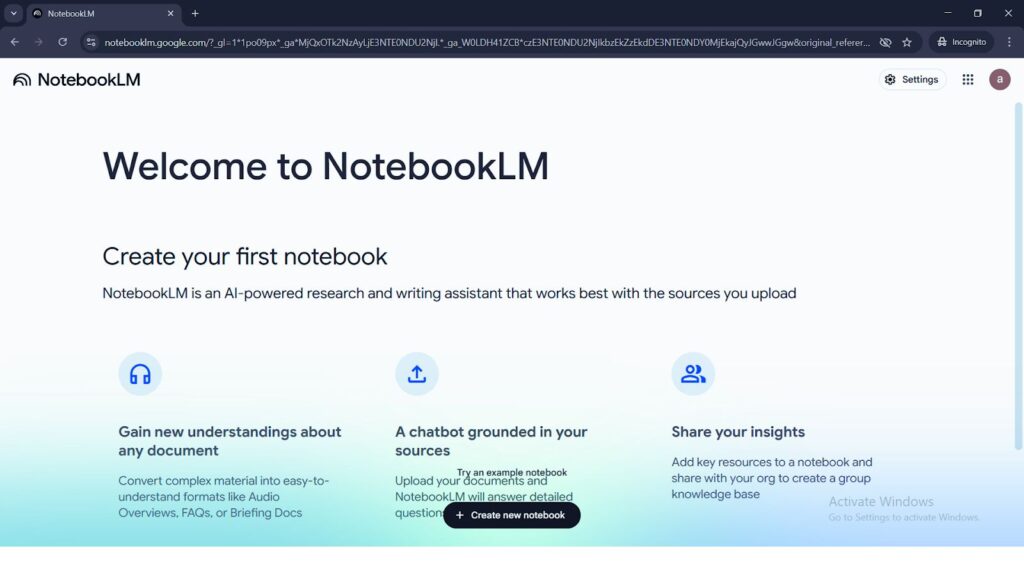
Once you’re logged in, create a new notebook for your project. Each notebook can hold multiple documents.
3: Upload Sources
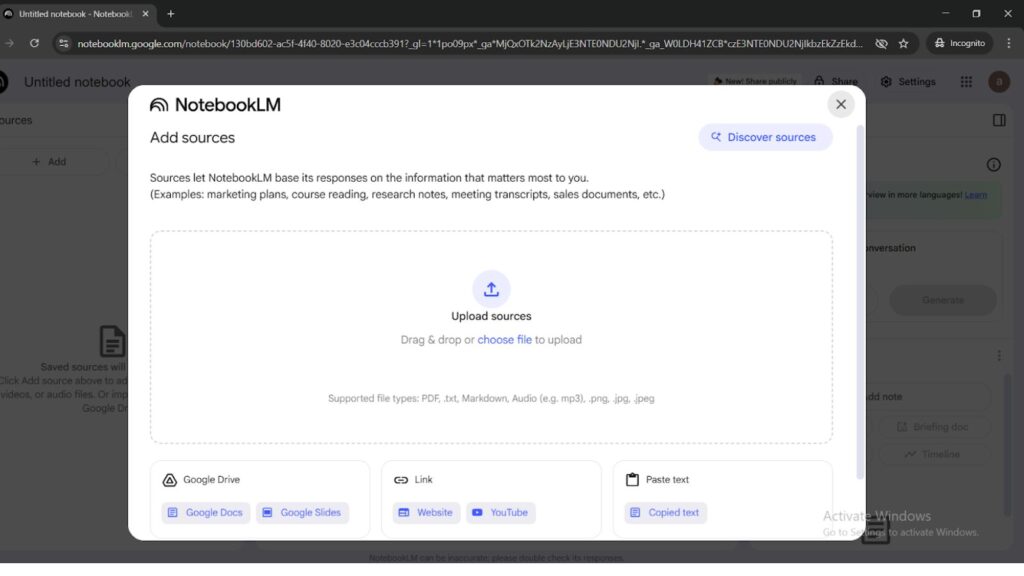
Next, upload the documents you want NotebookLM to analyze. You can add different types of sources such as PDFs, Google Docs, websites, or copied text.
Example: You can upload an AI research paper, blog articles, or notes related to your topic.
4: Ask Questions About the Documents
You can ask questions directly about the uploaded materials. NotebookLM will search through the sources and provide answers based on the content.
Example: You can ask questions like:
- “What are the main ideas in this document?”
- “Explain the key benefits mentioned in the report.”
NotebookLM Pricing
Another common question people ask after what is notebooklm is about pricing.
NotebookLM follows a freemium pricing model, which means users can start using the platform for free and upgrade to a paid plan if they need more advanced features and higher usage limits.
1. Free Plan – $0/month
The free version of NotebookLM is available to anyone with a Google account. It includes most core features but has some usage limits.
Key Features:
- Up to 100 notebooks
- Up to 50 sources per notebook (PDFs, Google Docs, websites, etc.)
- Around 50 chat queries per day
- Up to 3 audio/podcast overviews per day
Example: A student can upload lecture notes and research papers, ask questions, and generate summaries without paying anything.
2. NotebookLM Pro (Google AI Pro) – $19.99/month
The paid version is available through the Google AI Pro (Google One AI Premium) subscription. It provides higher usage limits and additional features.
Key Features:
- Up to 500 notebooks
- 300 sources per notebook
- Around 500 chat queries per day
- Up to 20 audio or podcast generations per day
- Access to advanced AI tools like Gemini Advanced and 2TB cloud storage
Example: A researcher analyzing hundreds of reports or documents can use this plan to upload more sources and generate deeper insights.
3. Ultra Plan – about $249.99/month
This high-tier plan is designed for heavy users, businesses, or advanced research projects.
Key Features:
- 600 sources per notebook
- Watermark-free output and advanced video creation
- Up to 5,000 chat queries per day
- Up to 200 audio and video overviews per day
Example: Companies analyzing large datasets or research teams working with thousands of documents can use this plan.
Table: NotebookLM Pricing
| Plan | Price | Notebooks | Sources per Notebook | Daily Chat Queries | Audio / Podcast Generation |
|---|---|---|---|---|---|
| Free Plan | $0/month | Up to 100 | Up to 50 | Around 50 per day | 3 per day |
| Google AI Pro | $19.99/month | UP to 500 | Up to 300 | UP to 500 per day | Up to 20 per day |
| Google AI Ultra | $249.99/month | Up to 500+ | Up to 600 | Up to 5,000 per day | Up to 200 per day |
NotebookLM vs ChatGPT
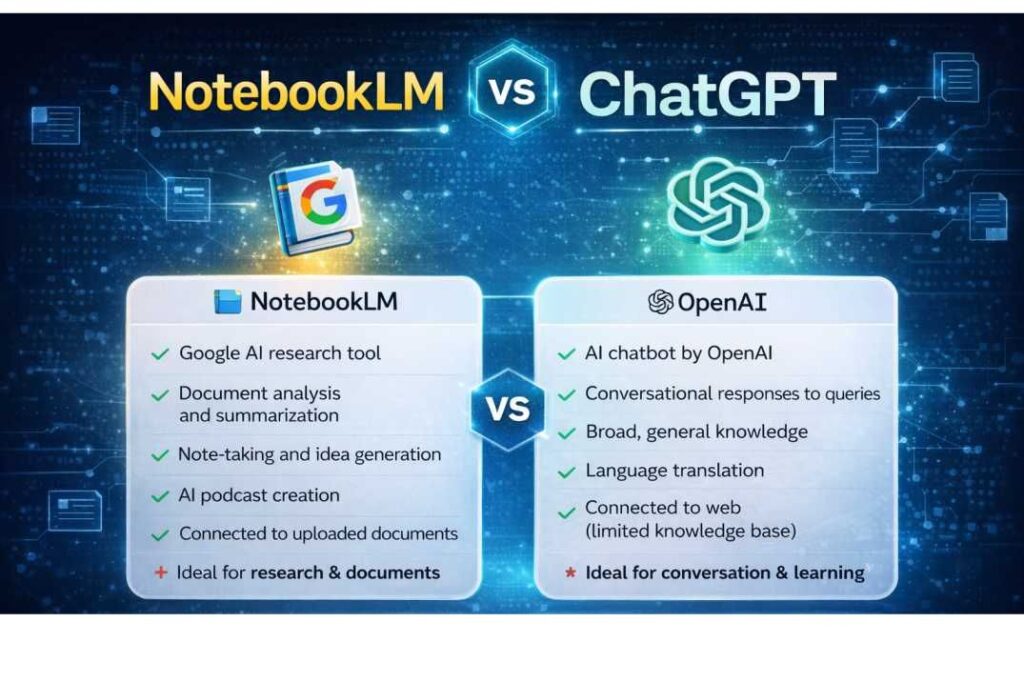
ChatGPT and NotebookLM are both powerful AI tools, but they’re designed for different purposes. NotebookLM focuses primarily on analyzing your uploaded documents, while ChatGPT is a general-purpose AI assistant that can answer questions, generate content, and assist with a variety of tasks.
NotebookLM is best suited for research, document analysis, and study material as it provides answers based on the sources you upload. ChatGPT is more flexible and is widely used for writing, coding, brainstorming ideas, and solving common questions.
NotebookLM vs ChatGPT Comparison Table
| Feature | NotebookLM | ChatGPT |
|---|---|---|
| Main Purpose | Research and document analysis | General AI assistant |
| Knowledge Source | Uses only uploaded documents | Uses internet training data and prompts |
| Accuracy | High accuracy with source citations | May sometimes generate incorrect facts |
| Best For | Research, study guides, document summaries | Writing, coding, brainstorming, general questions |
| Content Creation | Limited creative writing | Strong creative and content generation |
| Unique Feature | Podcast-style audio summaries | Advanced conversation and multi-tasking |
Example to Understand the Difference
Example 1 – Research Work
If you upload research papers or reports, NotebookLM will analyze those documents and give answers with references from the exact source.
Example 2 – Content Writing
If you ask for a blog post, marketing copy, or coding help, ChatGPT usually performs better because it is designed for creative and general tasks.
Benefits of NotebookLM
1. Saves Time in Research
NotebookLM helps users quickly understand long documents by automatically generating summaries and key points. This reduces the time spent reading large files such as research papers, reports, or articles.
Example:
If you upload a 50-page research report, NotebookLM can summarize the most important insights in a few bullet points.
2. Improves Learning and Understanding
The tool helps users better understand complex topics by explaining information in simple language and answering questions about uploaded documents. This makes it useful for students and researchers studying difficult subjects.
Example:
A student studying machine learning can upload study materials and ask NotebookLM to explain key concepts in simpler terms.
3. Organizes Knowledge in One Place
NotebookLM allows users to store different sources such as PDFs, websites, and notes, in a single notebook. This helps organize research materials and makes it easier to manage information.
Example:
A blogger can upload multiple AI articles, research papers, and notes into one notebook and analyze them together.
4. Provides Accurate Answers with Sources
NotebookLM answers questions using the uploaded documents and often provides references to the original content. This improves reliability compared to tools that rely only on general knowledge.
Example:
If you ask “What are the main conclusions of this report?”, NotebookLM will give the answer along with the section where the information appears.
5. Supports Collaboration and Teamwork
Users can share notebooks with teammates or collaborators, making it easier to work together on research or projects.
Example:
A research team can share a notebook containing interview transcripts and reports, allowing everyone to analyze the data together
Limitations of NotebookLM
Although what is NotebookLM is often described as a powerful AI research tool, it still has several limitations that users should understand before relying on it completely.
1. Works Only with Uploaded Sources
NotebookLM mainly generates answers based on the documents you upload. If the information is not present in those sources, the tool may not be able to provide a useful answer.
Example:
If you upload only two articles about AI and ask a question about a different AI tool that is not mentioned in those documents, NotebookLM may not provide a correct answer.
2. Limited Supported File Types
NotebookLM supports some formats, such as PDFs, Google Docs, and web pages, but it does not support many other file types, like spreadsheets, databases, emails, images, or handwritten notes.
Example:
If your research data is stored in a CSV spreadsheet, NotebookLM may not be able to analyze it directly.
3. Dependent on Source Quality
The quality of NotebookLM’s answers depends heavily on the quality of the documents you upload. If the sources contain incomplete or incorrect information, the AI responses may also be inaccurate.
Example:
If you upload poorly written notes or incorrect data, NotebookLM may generate misleading insights.
Conclusion
Now you clearly understand what is notebooklm and how it works.
NotebookLM is a powerful AI research tool created by Google that helps users analyze documents, generate insights, and organize information.
Its ability to work with personal sources makes it different from traditional AI chatbots.
If you often work with research materials, documents, or large amounts of information, NotebookLM can become a valuable productivity tool.
Read Our Trending Articles:
The New AI Model That Could Challenge ChatGPT
10 Best Free AI Courses With Certificate
These AI Tools Can Create 2D Animation Videos
FAQs: What is NotebookLM
Q1. Is NotebookLM free
Yes, NotebookLM is free to use. Anyone with a Google Account can take advantage of its core features, such as uploading documents, asking questions, and creating summaries. However, Google also offers paid plans for advanced users with higher limits and additional AI features.
Q2. Notebooklm what is it
NotebookLM is an AI-powered research and note-taking tool developed by Google. It helps users analyze documents, generate summaries, ask questions, and organize information in one place. The tool works mainly with the sources you upload, such as PDFs, Google Docs, and web pages, making it useful for research, studying, and content creation.
Q3. Is NotebookLM safe to use
Yes, NotebookLM is safe to use. It includes privacy protections, and your uploaded documents are not used to train AI models. However, it is still recommended not to upload sensitive or confidential information.
Q4 What’s the best AI for making notes
The best AI for making notes depends on your needs. Notion AI is great for everyday note-taking and organization, while NotebookLM is better for research because it can analyze documents and generate summaries. Many users also use Obsidian for advanced note management and linking ideas.