
Claude for Microsoft Word is now officially available in beta. Anthropic, the AI safety company behind Claude, has brought its powerful AI assistant directly inside Microsoft Word. If you write, edit, or review documents every day, this is the update you have been waiting for. In this guide, we explain everything about Claude for Microsoft Word — what it does, who can use it, and why it is a major step forward for workplace AI.
What Is Claude for Microsoft Word?
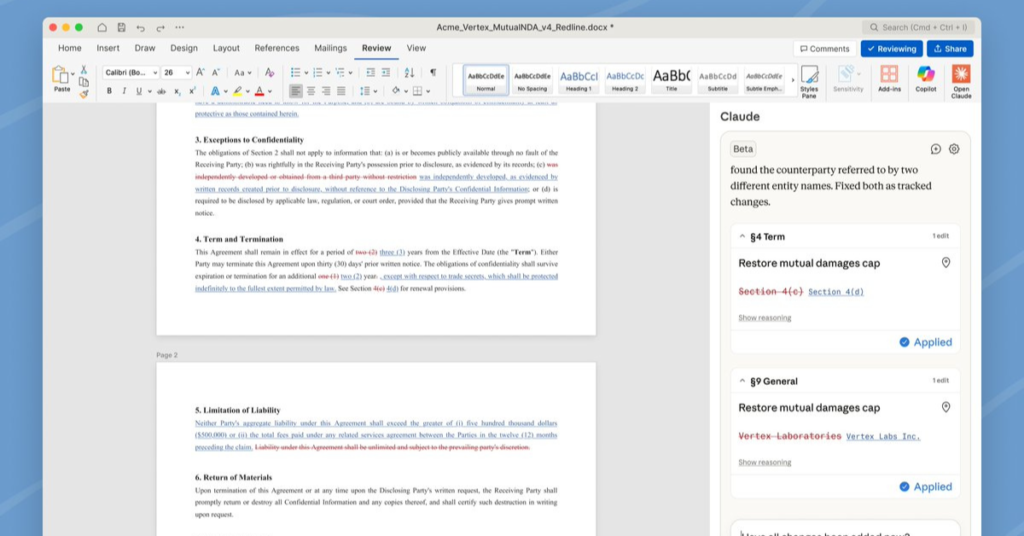
Claude for Microsoft Word is made by a company called Anthropic. They built an AI assistant named Claude. Now, Claude works inside Microsoft Word as a sidebar.
A sidebar is a small panel on the side of your screen. You type a question or request in the sidebar. Claude reads your document and helps you improve it.
For example, you can say:
- “Make this paragraph shorter.”
- “Rewrite this in simple English.”
- “Write an introduction for this report.”
- “Fix the grammar in this section.”
Claude will do it for you — right inside Word. This is what Claude AI in Word makes possible.
What Can Claude Do in Word?
Write new content
You can ask Claude for Word to write a full paragraph, an introduction, a conclusion, or even an entire document. Just tell it what you need in plain English and it will write it for you.
Edit your existing text
Already have something written? Claude AI in Word can make it better. It can make your writing shorter, cleaner, more professional, or easier to read. It understands context, so it will not just change random words — it understands what you are trying to say.
Show edits as tracked changes
This is a very useful feature. When Claude for Microsoft Word makes a change, it shows the change as a “tracked change.” This means your original text is still there. You can see what Claude changed and decide if you want to keep it or not. Your formatting stays safe.
Work across Word, Excel, and PowerPoint
This is something no other AI tool does yet. Anthropic Claude Microsoft Word integration lets Claude connect all three Office apps. This means:
- You can take data from an Excel sheet and turn it into a paragraph in Word.
- You can turn a Word document into a PowerPoint outline.
- The slides can be referred to while writing the report.
- All of this happens in one conversation.
Who Can Use It?
Right now, Claude for Microsoft Word is available in beta for users on Microsoft 365 Team and Enterprise plans. These are the business plans that most companies use.
If your company uses Microsoft 365 at work, ask your IT team to enable the Claude add-in. Personal (home) plan support is not available yet, but it may come later.
How to Use Claude for Microsoft Word — Step by Step
- Make sure you have a Microsoft 365 Team or Enterprise plan.
- Open Microsoft Word on your computer (Windows or Mac) or in your browser.
- Look for the Claude sidebar on the right side of the screen.
- If you don’t see it, go to Insert → Add-ins and search for “Claude by Anthropic.”
- Type your request in the sidebar. Example: “Make this email sound more friendly.”
- Claude will suggest changes as tracked edits. Accept what you like and reject the rest.
- Keep chatting with Claude to make more changes until you are happy with the document.
Why Is This a Big Deal?
Microsoft already has its own AI tool inside Word. It is called Microsoft Copilot. So why does Claude for Word matter?
Here is the honest truth: Copilot has very low adoption. Only about 3% of people who can use Copilot actually use it regularly. Many users find it limited or not helpful enough for real writing work.
Claude AI Word integration gives you a better option. Claude is well-known for writing clear, natural, and high-quality text. It understands tone, context, and complex writing tasks better than most AI tools. Many users who have tried both tools prefer Claude’s output for writing.
Simple way to think about it: Copilot is like a basic calculator. Claude for Microsoft Word is like having a smart, experienced writer sitting next to you.
Claude for Word vs Microsoft Copilot
| What to compare | Claude for Word | Microsoft Copilot |
|---|---|---|
| AI behind it | Anthropic Claude | OpenAI GPT-4 |
| Shows tracked changes | Yes | Limited |
| Works across Office apps | Word + Excel + PowerPoint | Mostly Word only |
| Writing quality | Excellent | Good |
| People actually using it | New and growing | Only ~3% |
| Keeps your formatting safe | Yes | Sometimes |
Related Articles: Generative AI vs Agentic AI: 7 Key Differences
Who Should Use Claude for Word?
Claude AI in Word is great for:
- People who write reports or business documents every day
- Teams that work together on shared Word files
- Anyone who wants to write faster and with less effort
- People whose first language is not English
- Managers who need clean, professional documents quickly
- Anyone who has tried Copilot and felt disappointed
If you spend even 30 minutes a day writing in Word, Claude for Microsoft Word can save you a lot of that time.
Frequently Asked Questions (FAQs)
Is Claude for Microsoft Word free?
It is free to use if you already have a Microsoft 365 Team or Enterprise plan. There is no extra charge announced yet. This may change when it leaves beta.
Does Claude for Word work on Mac?
Yes. Claude for Word works on both Windows and Mac, and also in the browser version of Word (Word Online).
Will Claude read my private documents?
Anthropic has a strict privacy policy. For enterprise users, your documents are handled according to Anthropic’s enterprise data rules. Always check with your company’s IT team before using AI tools on sensitive documents.
Can I use Claude for Word on my personal laptop?
Yes, as long as you are logged into a Microsoft 365 Team or Enterprise account on that laptop. Personal Microsoft 365 plans are not supported yet.
Does Claude replace Copilot?
No. They are two separate tools from two different companies. But you can choose to use Anthropic Claude Microsoft Word instead of Copilot if you prefer its writing quality.
Can Claude handle long documents?
Yes. Claude AI Word integration can read and understand long documents — like 20-page reports or long contracts — before making suggestions. This makes it useful for serious business writing work.
Final Thoughts
Let’s keep it simple. Claude for Microsoft Word is a smart AI writing assistant that works right inside Word. helps you write faster, edit better, and produce cleaner documents — without leaving your Word window.
It shows edits as tracked changes, so you stay in control. It connects with Excel and PowerPoint too. And it is made by Anthropic, one of the most trusted AI companies in the world.
If you have a Microsoft 365 Team or Enterprise plan, there is no reason not to try it. Give Claude AI in Word a shot — it may be the most useful tool you add to your workflow this year.